Softi FreeOCR

Softi FreeOCR
License:
Free
Language:
English
Developer:
Developer's website
OS:
Win2000/XP
Updated:
See detailed info

Softonic review

Nick Mead

“Convert scanned documents into text”

by Nick Mead about Softi FreeOCR

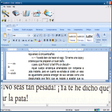
If you don't have time to type a document, why not scan it and turn it into text instantly? Softi FreeOCR is a program that serves to interpret scanned documents and to turn them to editable text on your PC. If you have a lot of documents that you need to transfer to editable text, then this could save you hours of time.

Note that this program only detects English text. Softi FreeOCR, or rather Tesseract - the OCR motor that the program uses - only recognises English. However, you can add other languages by uploading them from the developer website and extracting the files to “the tessdata” folder which can be found within the program folder.

This is a decent attempt at a text reading program but unfortunately, it doesn't always read documents correctly and has trouble with small text. Nevertheless, it can capture the majority of a document which will save you time.

Pros
  • Saves time by turning scans into text
  • Very quick and easy to use
  • Reads many text types
Cons
  • Doesn't always read text correctly
  • Limited language range
Free Download Softi FreeOCR 2.6

Softi FreeOCR is virus free

We have analyzed the latest version of Softi FreeOCR with 30 antivirus engines and it is virus free. See analysis results.

TESTED VIRUS FREE - Softonic GUARANTEED

Developer's description

Softi FreeOCR is a complete scan and OCR program including the Windows compiled Tesseract free ocr engine V2.00. It includes a Windows installer and is very simple to use.

It supports multi-page tiff's, fax documents as well as most image types including compressed Tiff's which the Tesseract engine on its own cannot read. It now has Twain scanning included and support for multi page Tiff documents. Best of all it is totally free!

Review and rate Softi FreeOCR

Your avatar

Your opinion is important.
Help other users - be the first to review this program.

Review
  1. Maximum: 75 characters

  2. See example

Pros and Cons
Rate
  1. What rating would you give Softi FreeOCR?

    You need to fill in all fields

    • Usability:

      Not rated
    • Stability:

      Not rated
    • Installation:

      Not rated
    • Functionality:

      Not rated
    • Appearance:

      Not rated
    • Overall rating:

      Not rated
  2. Don't worry, we won't make your email address public.

You're not allowed to share serial numbers, cracks, etc. or link to pages that contain them. If you do, your user account will be deleted, your IP address logged and legal action will be taken.

Get started - just ask a question!

Write a title for your question.

Alternativesto Softi FreeOCR

  • In English:
    EasyScan
    EasyScan

    Simple image scanning tool

    Softonic rating:
    • 6/10
    User rating:
    • 10/10
  • Smaller file:
    SimpleOCR
    SimpleOCR

    Character recognition software

    Softonic rating:
    • 6/10
    User rating:
    • 1/10
Compare with Softi FreeOCR

Screenshots from Softi FreeOCR

Download rank: Scanning & OCR

2 of 10

Softonic rating:
  • Good
  • 7/10
User rating: (7 ratings)
  • Very good
  • 8/10
Your rating:
Your rating
  • 0

Review and rate this program

Blog posts about Softi FreeOCR

More

Top Downloads: Scanning & OCR

  • United States
  • Global

  1. Digitize paper documents

Reviews of Softi FreeOCR in other languages